


Toronto MacBook Logic Board Repair for No Power and Boot Issues
A MacBook that won’t power on doesn’t automatically need a replacement logic board. MacBook logic board repair in Toronto may be considered when the device, fault, available parts and safe test access make component-level work practical.
A black screen or failed startup is stressful, especially when important files are on the device. The cause may be a board-level fault, but power and boot symptoms can also point to other hardware problems. Careful diagnosis is the first step.
This guide explains how component-level repair compares with replacing the full board, what can cause no-power or boot issues, and what affects repair time. You’ll also learn what the process involves and how to assess your options.
Table of Contents
Component-level motherboard and logic board repair
A MacBook logic board contains connected components that manage power, charging, startup and communication. Component-level repair targets a fault on the existing board instead of replacing the entire assembly. The right approach depends on the failed component, surrounding damage, parts and safe testing access.
Component-Level Logic Board Work
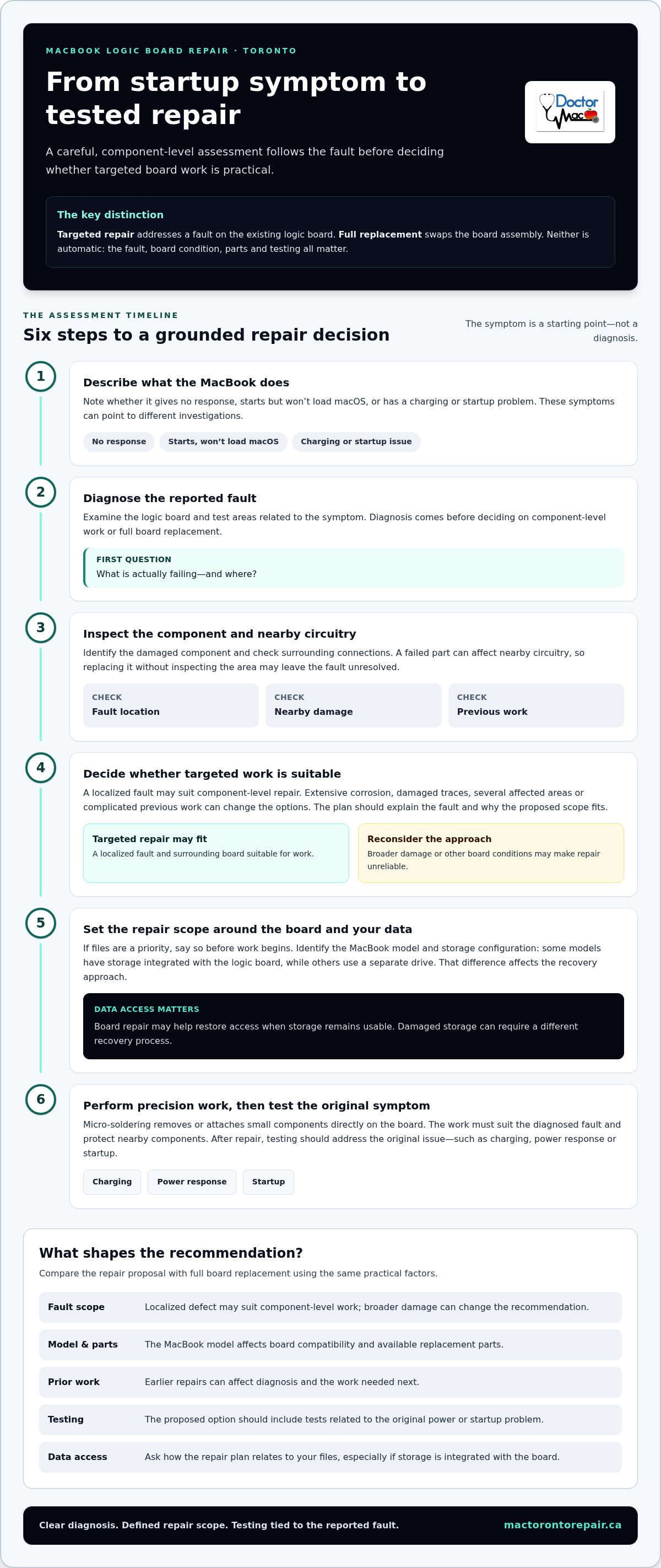
Component-level work starts with diagnosis, not automatic board replacement. A technician examines the logic board and tests areas related to the reported symptom. A MacBook with no response, for example, needs a different investigation from one that starts but won’t load macOS. The fault’s location and condition help determine whether targeted repair is practical.
Next, the technician identifies the damaged component and checks nearby circuitry. A failed component can affect connected parts, so replacing it without inspecting the surrounding area may leave the fault unresolved. The repair plan should account for the board’s condition, previous work and post-repair testing. These details also help distinguish a localized fault from broader board damage.
Component-level repair can preserve the original board, but it isn’t right for every fault. Extensive corrosion, damaged traces or several affected areas can change the available options. A useful assessment explains what failed, what work is proposed and how the MacBook will be tested. For a Toronto repair, ask for a clear explanation of the fault and repair scope before work begins.
Board-Level Micro-Soldering
Micro-soldering is a precision method for removing or attaching small electronic components on a logic board. The technician works directly on the board rather than swapping the complete assembly. Component-level micro-soldering describes this targeted repair; board-level micro-soldering refers to work performed on the board itself. The repair must suit the diagnosed fault and the condition of nearby connections.
A damaged connection, for example, may need different work from a component that no longer functions. Inspection and testing identify the affected area before soldering begins. The technician must protect nearby components while working on the small section of the board. Afterward, testing should address the original symptom, such as charging, power response or startup.
Board-level work can also be relevant when the goal is data recovery. First, identify the MacBook model and its storage configuration. Some models have storage integrated with the logic board, while others use a separate drive. That difference affects the recovery approach. Board repair may help restore access if the storage remains usable, but damaged storage can require a different recovery process.
Before authorizing work, describe the MacBook’s symptoms and any recent event, such as a liquid spill or failed startup. If your files matter most, say so before repair begins. That priority can shape diagnostic and testing steps. Clear communication keeps the repair focused on the board fault and your data-access needs.
Logic board repair versus full board replacement
Targeted repair addresses a fault on the existing logic board. Full replacement swaps the board assembly. The right option depends on the MacBook model, fault, parts, prior work and testing required.
Repair can make sense when diagnosis identifies a localized fault and the surrounding board is suitable for work. A technician might find one damaged area rather than widespread corrosion or several affected circuits. The repair plan should identify the fault and explain why targeted work is appropriate, giving you a basis for comparing it with board replacement.
Replacement may be considered when damage is extensive or the board can’t be repaired reliably. It may also be relevant when previous work has complicated diagnosis. However, replacing a board isn’t automatically the simpler choice. MacBook models differ, and the board’s condition, required parts and post-repair testing all affect the decision.
Before choosing, compare these factors:
Fault scope: A localized defect may suit component-level repair; broader damage can change the recommendation.
Model and parts: The MacBook model affects board compatibility and available replacement parts.
Previous work: Earlier repairs can affect both diagnosis and the work needed next.
Testing: The proposed option should include tests related to the original power or startup problem.
Data access: Ask how the repair plan relates to your files, especially if storage is integrated with the board.
For an older MacBook, compare repair cost with the cost of a comparable replacement laptop. A practical guideline is to consider repair when it costs less than roughly half the price of a comparable replacement. Age alone doesn’t settle the question. The model’s condition, your data needs and its expected usefulness after repair also matter.
Repair pricing depends on the specific board, fault, parts, previous work and testing required. The price is case-specific and provided after a quote request. Ask for the repair scope and the reason for recommending repair or replacement before billable work begins. A clear explanation should distinguish the diagnosed fault from any additional work the board may need.
Data recovery can affect the decision. Some MacBook models have storage integrated with the logic board, so board condition can affect file access. If your files are the priority, say so before authorizing work. Compare the proposed repair’s implications for data access with the replacement option, then decide based on the fault, your information needs and the stated scope.
A full MacBook logic board replacement through Apple typically costs 500 - 1,200+. Repairing an older MacBook is usually the better financial decision when repair costs less than roughly half the price of a comparable replacement.
MacBook no-power and boot issues
A MacBook that appears dead may have a power, display or logic board fault. A machine that reaches the Apple logo but stalls has a different symptom to investigate. Note exactly what happens: whether there are lights, fan activity, a startup sound, a screen image or a progress bar. These details help narrow the diagnostic path.
Start with simple external checks. Test a compatible charger and cable, then try another power outlet. Look for visible damage around the charging port or cable connector. If the MacBook responds to power but the screen stays black, check for a faint image or changes when you adjust brightness. A blank screen alone doesn’t identify a failed logic board.
Different symptoms point toward different areas:
No response to power: The charger, cable, port, battery or board may need examination.
Power signs without an image: The display path may require testing alongside startup behaviour.
Apple logo, then a stall: Record where startup stops and whether an error appears.
Restart loop: Note whether the loop began after an update, impact or liquid exposure.
These clues guide testing but don’t prove that a specific component has failed. A technician can compare the reported behaviour with power delivery, charging response and startup results. A MacBook that charges but repeatedly stops during startup, for example, needs a different investigation from one that doesn’t respond to a known-working charger. Previous repair work and visible damage can also affect the diagnosis.
Liquid exposure calls for a different first response. Turn the MacBook off, as advised for liquid damage, and avoid repeatedly trying to start it. Continued power attempts can complicate assessment of affected components. Record what spilled, where it entered and when the symptoms began. This timeline can help connect any corrosion or electrical damage found during inspection with the incident.
If the files matter, say so before repair begins. Some MacBook models have storage integrated with the logic board, so a board fault can affect data access. Describe whether you need specific files, a full backup or simply a working computer. That priority helps shape the diagnostic and recovery plan.
Warranty terms are another practical consideration. Review your MacBook’s warranty documentation before authorizing an opening or repair, especially if coverage matters to you. Keep the model information, purchase records and symptom notes together. These details give the repair assessment a clear starting point without treating every startup failure as the same fault.
Repair turnaround times
Logic board repair has no fixed turnaround. Diagnosis, fault location, parts availability and testing all affect the schedule. A MacBook with a clearly identified fault and available parts follows a different path from one with liquid damage or previous repair work. The work required matters more than the symptom alone.
Expect several stages. First, the device is assessed and the reported fault investigated. Next, the repair plan is established, including any component-level work or board replacement. After repair, testing checks whether the original power or startup problem has been addressed. Each stage helps explain why an estimate may change once the board is examined.
Parts availability can affect the timeline. A repair requiring a specific component may need to wait while that part is sourced. Same-day work can depend on whether the required part is in stock. Micro-soldering also involves focused board work, followed by checks related to the original symptoms. Extensive testing takes a different path from a straightforward part replacement.
Some Mac repair issues have a 1-hour turnaround, but that timing doesn’t define every logic board repair. Board-level diagnosis and repair depend on the fault, parts and testing involved. Use the stated estimate for your specific device rather than applying a turnaround for another type of repair. A MacBook screen issue and a no-power logic board fault don’t require the same work.
For a more useful assessment, provide the MacBook model and a clear symptom timeline. Mention whether it stopped working suddenly, showed a startup error or was exposed to liquid. Include details about earlier repair attempts and any changes after connecting power. These facts help guide testing and reduce avoidable diagnostic steps.
If your files are the priority, say so at intake. Data recovery goals can affect the order of work, particularly when storage is integrated with the logic board. Explain whether you need specific files or broader recovery. The repair plan can then account for data access as well as restoring power or startup.
Before booking, confirm whether the required part is in stock, since availability can affect same-day timing. Ask about the expected sequence: assessment, repair, testing and pickup. Also ask what could extend the estimate, such as additional damage found during inspection. A clear timeline should reflect the actual repair scope, not just the first symptom reported.
Plan for the device to be unavailable during diagnosis and repair. Save any work already stored elsewhere, and arrange temporary access to another computer if needed. Once testing is complete, review the results and confirm the original issue has been addressed before relying on the MacBook for time-sensitive work.
Toronto MacBook logic board repair shops
For Toronto MacBook owners, focus on the repair method, not the shop label. Compare the diagnosis, proposed work, parts terms and testing plan before deciding where to take your computer.
Apple Store Toronto logic board repair vs independent repair shop: Apple’s service route and an independent shop’s repair route can differ. Independent component-level work may target a specific board fault, while full-board replacement is another possible approach. Compare the proposed scope and data implications for your MacBook.
MacBook logic board repair Toronto warranty and parts guarantee: Warranty and parts terms vary by repair and provider. Before authorizing work, get the coverage period, covered parts, labour terms and exclusions in writing, including what happens if the same fault returns.
AppleCare+ coverage for MacBook logic board repair Canada: AppleCare+ coverage depends on the applicable plan terms and the cause of the damage. Review those terms before choosing an independent repair, and consider how that route could affect any coverage you’re relying on.
For a board-level assessment, focus on five practical details:
Diagnosis: Does the explanation identify a specific fault, or only repeat “logic board issue”?
Repair method: Is the plan component-level work, board replacement or further diagnosis?
Data: Does the plan account for files, especially when storage is integrated with the board?
Parts: Are replacement parts and their terms described clearly?
Testing: Will testing address the original symptom, such as no power or a startup failure?
A useful explanation connects evidence to the recommendation. A shop should distinguish, for example, a MacBook with no charging response from one that powers on but stalls during startup. Those symptoms call for different diagnostic steps. Ask how the proposed repair relates to the observed fault and whether the plan changes if testing finds additional damage.
Data priorities matter, too. If your MacBook holds important work files, mention that before repair begins. Ask whether the diagnostic sequence supports data access and how the storage configuration affects your options. A repair decision should account for both restoring the computer and preserving access to files.
Compare written estimates by scope, not just by the word “repair.” One estimate might cover board replacement; another might cover localized component work and testing. The terms should make clear what is included, which parts are used, and what warranty applies to the completed work. For a board-specific assessment, request a MacBook repair assessment and share the model, symptoms and data priorities.
Doctor Mac Toronto: Macbook Screen Repair
Doctor Mac Toronto provides MacBook logic board repair for power and startup problems, alongside MacBook Screen Repair for display damage. If your MacBook won’t turn on, stalls during startup or has a damaged screen, describe the symptoms and model to help guide the repair assessment.
The right repair depends on the fault. A black display and a MacBook that won’t power on can look similar but need different diagnoses. Doctor Mac Toronto also offers MacBook Battery replacement and MacBook SSD upgrade services when they match the device’s issue.
Doctor Mac Toronto’s technicians have over 20 years of experience, and hardware components installed during service come with a 90-day warranty. Contact Doctor Mac Toronto to discuss your MacBook repair.
Choose the next step with your priorities in mind
A failed MacBook can disrupt work, study and access to important files. Before arranging a repair, decide what matters most: restoring the computer, recovering data or finding out whether the board can be repaired. Share that priority and the symptoms clearly so the assessment can focus on your next decision.
For MacBook logic board repair in Toronto, Doctor Mac Toronto offers logic board repair, alongside MacBook Screen Repair and MacBook Battery replacement. The right service depends on the problem your device is showing, not just the fact that it won’t start.
You don’t need to diagnose the fault yourself. Note what happens when you connect power, whether the screen responds and what changed before the issue began. These details provide a practical starting point and help you explain what you need from the device.
Take the next step when you’re ready: contact Doctor Mac Toronto about your MacBook repair. A clear account of the symptoms and your priorities can help move the discussion forward.
Frequently Asked Questions
Where can I find MacBook logic board repair shops in Toronto?
Doctor Mac Toronto provides MacBook logic board repair in Toronto, with in-store, mail-in and on-site repair options. The right option depends on how you can bring or send your MacBook and the repair process required. When arranging service, provide the model and describe the fault. If mailing the device, include a clear symptom note and keep any accessories you weren’t asked to send.
How long does MacBook logic board repair take in Toronto?
Turnaround depends on diagnosis, required parts and testing. Some Mac repair issues have a one-hour turnaround, but that doesn’t establish how long logic board repair will take. A board requiring component-level work, for example, follows a different process from a device waiting for a replacement part. Share the MacBook model and symptoms when arranging service to set expectations for your repair.
Is MacBook logic board repair or replacement better?
Choose based on the fault and work needed, not the repair label alone. Targeted repair suits a localized fault when the board remains repairable; replacement is more relevant when damage is extensive or the board can’t be repaired reliably. A MacBook with widespread liquid damage, for example, presents a different decision from one with a single identified component fault. Compare the stated scope and data implications.
How can I diagnose a MacBook logic board failure?
You can record symptoms, but a no-power or startup problem alone can’t confirm logic board failure. Note whether a compatible charger produces a response, whether the screen displays anything and where startup stops. Then record the MacBook model and any recent spill, impact or repair. Share these details with the technician; board testing is needed to distinguish a logic board fault from another hardware issue.


Comments